
LLM cost control is one of those boring problems that does not feel urgent until the bill shows up. Most builders want to start with the agent: the prompt, the tool calls, the workflow, the clever handoff. That is understandable. But before you build an AI agent system that runs on real traffic, real customers, or real content, you need a way to estimate what the system will cost when it actually works.
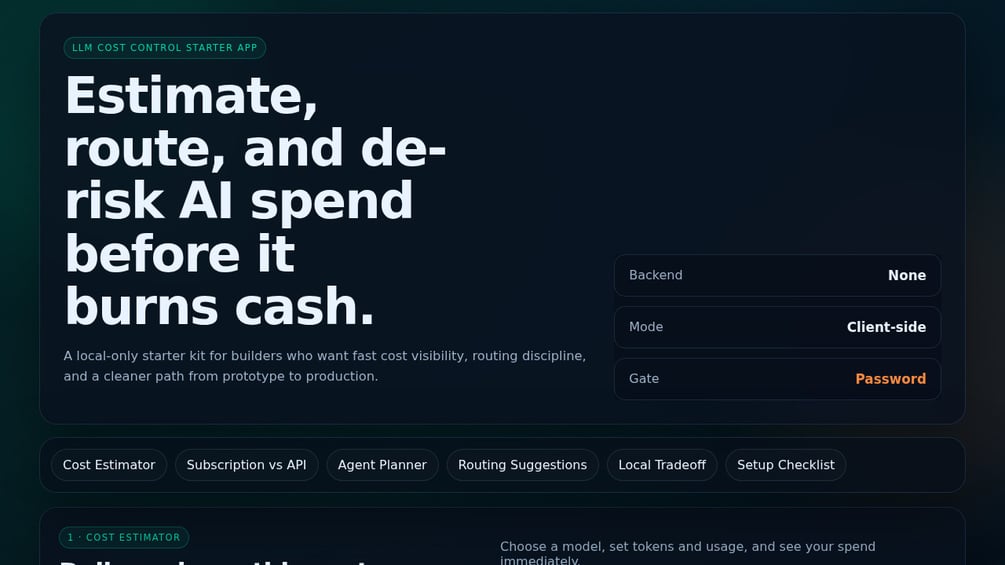
That is the reason I built the LLM Cost Control Starter App. It is not a giant platform. It is a $10 client-side web app for estimating, tracking, and controlling LLM spend before the numbers get away from you.
The hidden cost problem shows up after the demo works
The first version of an AI agent system is usually cheap because nobody is using it yet. You test a few prompts. You run a few sample inputs. You look at the output and think, “This could work.” That is the dangerous moment.
A demo does not tell you what happens when the system runs 50 times a day, retries failed calls, routes messy inputs to a stronger model, stores context, summarizes long records, and sends outputs through another verification step. Those are the parts that turn a clever workflow into an operating cost.
LLM cost control starts before the agent is live because the cost shape is built into the design. If every request goes to the strongest model, you pay for that decision every time. If every agent keeps too much context, you pay for that too. If you do not know which tasks deserve premium reasoning and which tasks can run on a cheaper model, the bill becomes a tax on unclear architecture.
That is not a reason to avoid AI agents. It is a reason to build with eyes open. You need a rough cost model before the system gets enough usage to surprise you.
LLM cost control starts with routing discipline
Most builders think about model choice like a quality decision. Better model equals better output. Sometimes that is true. But in a working agent system, model choice is also a routing decision.
Not every task needs the same level of intelligence. A classifier, a summarizer, a formatting pass, a duplicate check, and a final strategic recommendation should not automatically use the same model. The work is different. The risk is different. The cost should be different too.
That is where routing discipline matters. A good AI agent system should ask a few simple questions before it spends money:
- Is this task low-risk or high-risk?
- Does it need reasoning, or just transformation?
- Can a smaller model handle the first pass?
- Should this step stop and ask for human approval?
- What happens if the call fails and needs a retry?
Those questions sound basic, but they change the build. You stop treating the model as one magic box and start treating it like a costed resource inside a system.
The LLM Cost Control Starter App is built around that idea. It includes routing guidance, a planner, and a local tradeoff calculator so you can compare the cost of different choices before those choices become habits.
The framework I would use before building the agent
If I were planning a new AI agent system from scratch, I would not start by opening the builder. I would start with a one-page cost map.
First, list every model call the system might make. Not just the obvious generation step. Include classification, enrichment, summarization, verification, retries, rewrites, research passes, and anything else that touches an API.
Second, estimate usage. How many times does this run per day? How many records does it process? How often will it retry? How long are the inputs? How long are the outputs? You do not need perfect numbers. You need numbers that are honest enough to make the risk visible.
Third, split the workflow by model tier. Cheap model where the task is simple. Stronger model where the work is expensive to get wrong. Human checkpoint where the consequence is too high to automate blindly.
Fourth, set a gate. Decide what budget threshold should make you pause, review, or redesign. LLM cost control is not just about finding the cheapest model. It is about knowing when the current design no longer makes financial sense.
That is the simple framework: map the calls, estimate usage, route by risk, and set a gate. You can do that in a spreadsheet if you want. I built the starter app because I wanted a more focused tool that keeps those questions in front of me instead of hiding them in a random tab I will forget to update.
The part most builders skip: subscription versus API math
There is another cost trap here. Builders often compare a monthly subscription to API usage like they are the same kind of expense. They are not.
A subscription is predictable. You pay the same amount whether you use it heavily or lightly, within whatever limits the product gives you. API usage is variable. That can be great when usage is low, but it can get uncomfortable when usage climbs or the workflow starts making more calls than expected.
The right answer is not always “use the API” and it is not always “buy the subscription.” The right answer depends on usage pattern, margin, risk, and whether the system creates enough value to justify the spend.
For example, if an agent saves you five hours a week on low-stakes internal work, a small API bill may be an easy yes. If the same agent is attached to a cheap front-end offer with thin margins, the economics are different. If every customer action triggers multiple model calls, you need to know the unit cost before you scale traffic.
That is why the starter app includes a local tradeoff calculator. It helps you look at the decision as a business owner, not just a builder. The model can be technically impressive and still be financially sloppy.
What the LLM Cost Control Starter App actually is
This is a client-side web app. That matters because it keeps the tool simple. It is meant to help you estimate, plan, and control LLM costs before they get out of hand. It includes a password gate, routing guidance, a planner, and a local tradeoff calculator.
The current price is $10 on Gumroad. That is the right size for what it is. It is not a SaaS dashboard with accounts, teams, charts, and usage ingestion. It is a starter app for builders who need a practical way to think through AI spend before building something that can quietly become expensive.
I would use it before building an agent, before pricing an AI-powered offer, before giving an automation more autonomy, or before wiring several model calls into a workflow. It is especially useful when you are still in the planning stage and every design decision is cheap to change.
If you are building around OpenAI models, keep the official OpenAI API pricing page nearby while you plan. Pricing changes, and the point here is not to memorize numbers. The point is to build the habit of checking the cost before you design the system around assumptions.
Where this fits with agent architecture
Cost control does not replace good agent design. It sits underneath it.
A clean agent still needs a defined job, inputs, permissions, memory rules, handoffs, and failure paths. I covered that broader structure in my post on the AI Agent Build Blueprint. The cost layer is one more piece of that same discipline.
The mistake is treating cost as an accounting problem after the build is done. By then, the expensive decisions are already wired in. The agent already uses a strong model for every task. The context window is already bloated. The retry logic is already noisy. The customer-facing workflow already assumes the margin will work.
LLM cost control belongs in the blueprint stage. It changes how you choose models, where you add gates, which tasks you automate first, and how much autonomy you give the system.
Who should buy this, and who should skip it
Buy this if you are building AI agents, internal automations, AI-powered products, or client workflows and you do not yet have a clear way to estimate LLM costs before launch. It is also a fit if you are a solopreneur trying to keep your build lean and you want a simple planning tool instead of another heavyweight dashboard.
Skip it if you already have mature cost monitoring, usage dashboards, model routing rules, and budget alerts in place. You probably do not need a starter app. Also skip it if you want a full backend system that automatically ingests API spend from every provider. This is not that.
And if you are just playing with prompts for fun, you may not need it yet. The moment you connect those prompts to repeatable work, customer usage, or a paid offer, the math starts to matter.
My verdict
I built this because I needed a practical checkpoint before giving AI systems more responsibility. The tool is intentionally small. That is the point. It forces the question most builders avoid at the beginning: what will this cost if it works?
That question matters more than people want to admit. A broken agent is obvious. An expensive agent can look successful right up until the margin disappears.
If you are planning an agent system, start with LLM cost control before you get lost in the build. Map the calls. Estimate usage. Route by risk. Set a gate. Then build the system with a clearer idea of what it can afford to do.
If you want the app, LLM Cost Control Starter App is available on Gumroad here. This is my own product, so buying it directly supports the work behind Piscion Global. Either way, know the cost before you build the agent.
Pingback: LLM Cost Control Starter App: How to Stop AI Spend From Creeping Up