
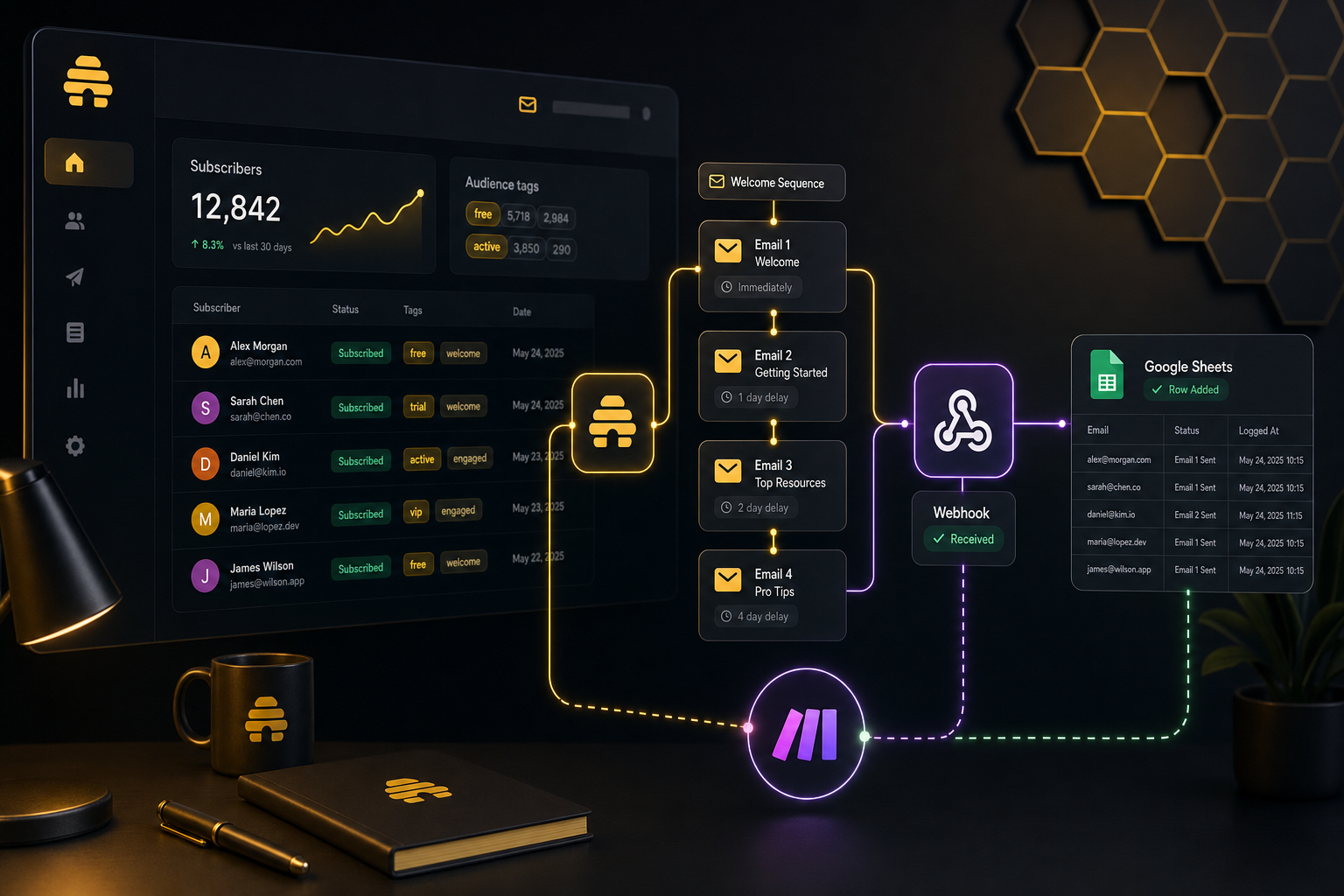
Beehiiv Make.com Automation: 3 Workflows I’d Set Up First
I got tired of doing the same newsletter chores by hand — tagging new subscribers, starting welcome sequences, and logging sends after the fact. That is the part that eats time when you are trying to run a list on the side. Beehiiv Make.com automation is the setup I’d use if I wanted the newsletter to keep moving without me living in the Beehiiv UI.
If you want to test Beehiiv first, I’ve linked my affiliate below. The price is the same to you either way — using my link just helps support the work here.
Quick answer:
- Why beehiiv make.com automation is worth setting up.
- Scenario 1: Auto-tag new subscribers by source.
- Scenario 2: Trigger a welcome email sequence on signup.
- Scenario 3: Log every send to a Google Sheet for analysis.
- What you need to get started.
Why beehiiv make.com automation is worth setting up
Beehiiv is fine for writing and sending. The gap is everything around the send: where the subscriber came from, what bucket they belong in, whether they should enter a welcome flow, and what happened after the email went out.
That is where Make.com earns its keep. It sits between Beehiiv and the rest of the stack so I can move data without opening five tabs and copy/pasting the same fields over and over. If you are looking for a beehiiv Zapier alternative, this is the kind of setup I prefer because I can branch, log, and clean up the data before it hits the next step.
Beehiiv’s current pricing makes this a little more interesting than it used to be. The free Launch plan gives you API access, but automations and webhooks are on paid plans. So if you want the fully native side of this workflow, you are looking at Scale. If you just want to wire Beehiiv into outside tools, Launch is enough to get moving.
That is the main reason I use Beehiiv + Make together instead of trying to force the newsletter platform to do everything on its own.
If you want the Beehiiv-only take first, I already wrote a review here: Beehiiv Review: What It Actually Feels Like for a Solo Newsletter.
If you want to try Beehiiv, here is my affiliate link: Beehiiv.
Scenario 1: Auto-tag new subscribers by source
This is the first thing I would automate.
If someone comes in from a lead magnet, a form on my site, or a specific checkout flow, I want that source tagged immediately. That way I can segment later without trying to remember where each subscriber came from.
The Make.com side is simple: catch the signup event, inspect the source field, and send the subscriber into Beehiiv with the right tag. If the source is “site popup,” tag them one way. If they came from a free download, tag them another way. If they bought something, I want that tagged too.
That sounds basic, but this is the kind of thing that keeps a list usable once it starts growing. A clean tag structure means better broadcasts, better automations, and less cleanup later.
I’d still keep a copy of the event in Google Sheets or Airtable if I wanted to audit later, but the point is to make the tagging happen once, at the edge, instead of after the mess piles up.
If you’re building this, I use Make.com for the glue.
Scenario 2: Trigger a welcome email sequence on signup
This is the one that saves the most visible work.
A new subscriber signs up, Make catches it, and Beehiiv either adds them to a sequence or kicks off the next step in the automation. I like this because it turns a dead signup into an actual follow-up path without me manually dropping people into a list or remembering to send a welcome email later.
If you stay on the free Launch plan, you can still use the API to move data around. If you want Beehiiv’s native automations and webhook handling, that lives on Scale or Enterprise. I’d only upgrade if the welcome flow is a real part of the business, not just a nice idea.
The workflow is practical: someone subscribes, Make enriches the data if needed, Beehiiv handles the sequence, and I get a cleaner handoff than I would from a one-off manual send. That is the difference between having a newsletter and having a system.
If you want to wire it up, I’d use Make.com for the trigger and Beehiiv for the send side.
Scenario 3: Log every send to a Google Sheet for analysis
This one is boring, and that is exactly why it works.
Every send gets logged: date, subject line, campaign name, list segment, maybe a link to the post version if I want to compare it later. I do this because newsletter stats are easy to forget once the send is over. A sheet gives me a simple record I can actually look at when I want to compare what worked.
Make.com is good here because it can catch the send event and write the row without me doing anything. If I want to get fancier, I can also append source tags, campaign type, or whatever else helps me spot patterns later.
This is also where Beehiiv’s native webhooks become useful on paid plans. If the platform fires the event, Make can catch it and push it somewhere I control. That is the cleanest version of the setup.
I’d use Make.com here too, because it keeps the logging out of my head. If you want the broader workflow side, I already covered that in How I Use Make.com to Automate My Affiliate Content Pipeline.
What you need to get started
You do not need a huge stack.
You need:
- a Beehiiv account
- a Beehiiv API key
- a Make.com account
- a destination for the logged data, if you want reporting
I’d start on Beehiiv’s Launch plan if I was testing the idea. It is free, and it gives you enough room to connect the dots before you pay for the native automation layer. If you already know you need Beehiiv automations and webhooks, go straight to Scale. You can check the current plan details on Beehiiv’s pricing page.
For Make, the Free plan is enough to prototype the flow. That is usually all I want at the beginning: prove the path, then decide whether the workflow is worth keeping. The current plan breakdown is on Make’s pricing page.
If you want the setup to be worth the time, use Beehiiv for the newsletter side and Make for the parts Beehiiv should not be doing by hand. That is the whole point.
If you want to try Beehiiv, here is my affiliate link again: Beehiiv.
My take
I would set this up if I was serious about growing a list and wanted the newsletter to behave like part of a system instead of a one-off send tool.
I would skip it if I only sent a newsletter once in a while and did not care about tagging, welcome sequences, or logging.
For me, Beehiiv Make.com automation is worth the setup because it removes the little jobs that pile up every week. That is the kind of automation that actually sticks.
If you want to try Beehiiv, I’ve linked my affiliate below. The price is the same to you either way — using my link just helps support the work here. Either way, now you know what it does.
About the author: Chris Myers builds AI-powered business systems and tests every tool in his own solopreneur stack before recommending it. He writes at Piscion Global.
Pingback: Beehiiv Native Automation Without Zapier: What Stays Native?